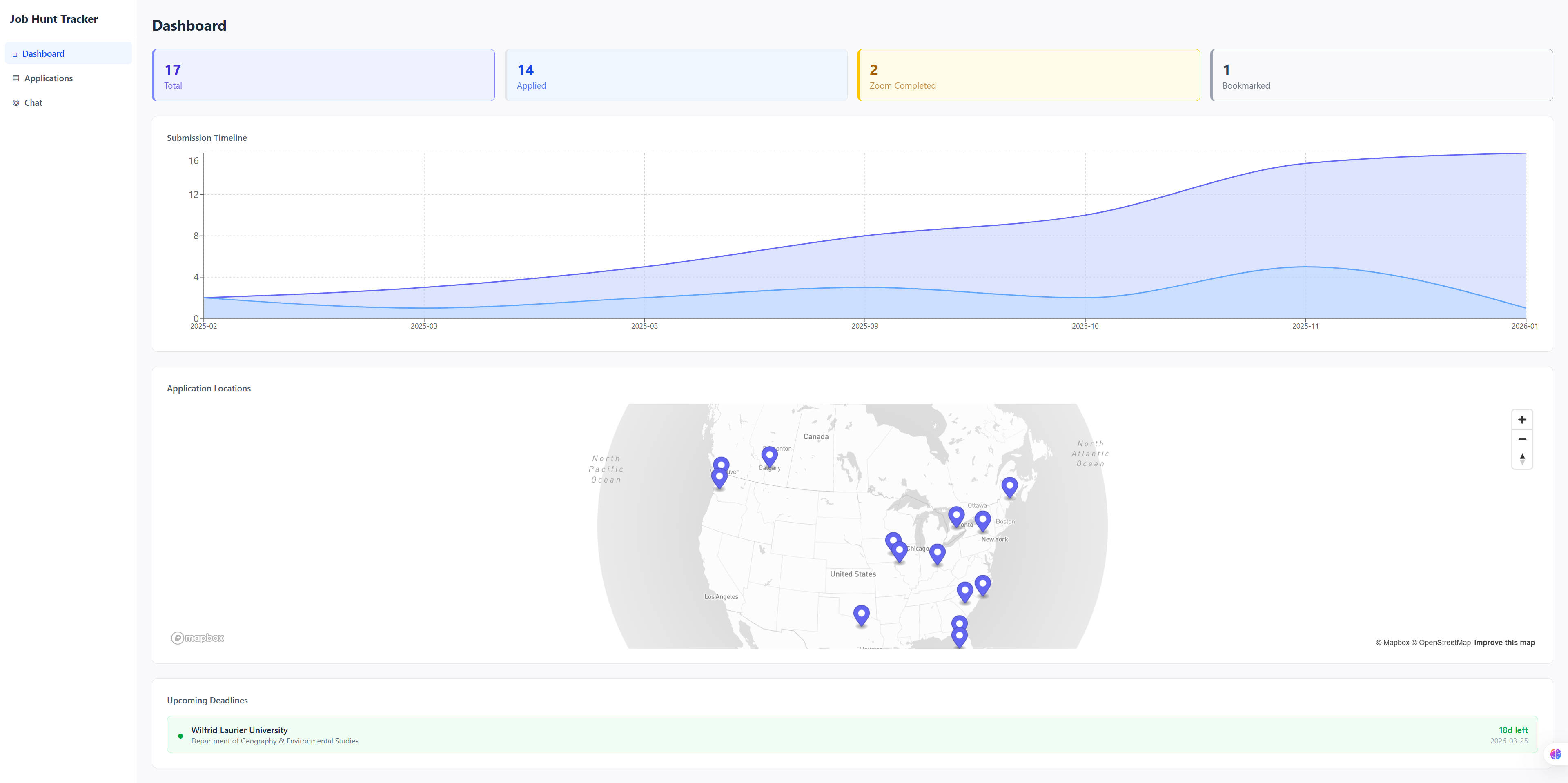
The academic job market is notoriously difficult to navigate, and keeping track of dozens of applications across different stages, deadlines, and documents quickly becomes overwhelming. I built a full-stack web application to manage the entire process, from bookmarking positions to tracking offers, with an AI chat interface that lets me query my application data in natural language.
The project is open source: academic-job-hunt.
Why Build This
Anyone who has gone through a faculty job search knows the pain. Positions are posted across multiple platforms with different deadlines. Each application requires a tailored set of documents: cover letter, research statement, teaching statement, DEI statement, recommendation letters. The timeline stretches over months, with stages ranging from initial submission to Zoom interviews, on-site visits, and offers. Spreadsheets work up to a point, but they do not scale well when you need to attach documents, visualize your pipeline, or quickly answer questions like “which applications have deadlines in the next week?”
I wanted a tool that fit my exact workflow rather than adapting to a generic project management app. This is another vibe coding project built entirely through conversation with Claude Code.
What the App Does
The application has three main views: a dashboard, an application management interface, and an AI-powered chat.
Dashboard
The dashboard provides an at-a-glance overview of the entire job search. Summary cards show total applications and breakdowns by stage. An upcoming deadlines section highlights applications due soon, color-coded by urgency: red for three days or fewer, amber for a week, green otherwise. A timeline chart built with Recharts visualizes submission dates over time.
The centerpiece is an interactive Mapbox globe that plots university locations using geocoded coordinates. Clicking a marker opens a popup with application details grouped by institution, including department, position type, current stage, and key dates. It turns a spreadsheet of data into something immediately comprehensible.
Applications
The applications page is a sortable, filterable table showing all tracked positions. Each row displays the university, department, position type, current stage (with color-coded badges), deadlines, and submission dates. Filters let me narrow by stage or position type.
Creating a new application can be done manually through a form, but the more useful path is PDF extraction. Uploading a job posting PDF triggers OpenAI’s structured output to automatically extract the university name, department, location, position type, deadline, start date, and contact information. The extracted fields pre-fill the form for review before saving.
Each application has a detail view with a visual stage tracker showing progression through the pipeline: bookmarked, applied, Zoom scheduled, Zoom completed, on-site scheduled, on-site completed, oral offer, official offer, and accepted (with terminal states for rejected and withdrawn). Documents can be uploaded per application with drag-and-drop support, organized by type.
Chat
The chat interface is where things get interesting. It uses a LangGraph ReAct agent backed by GPT-4o-mini that can query the SQLite database directly. I can ask questions like “How many applications have I submitted?”, “List all upcoming Zoom interviews”, or “Which positions have deadlines this week?” and get accurate answers drawn from my actual data.
The agent has access to the full database schema and writes SQL SELECT queries on the fly. Conversations persist within a session, so follow-up questions work naturally. It turns the database into something I can have a conversation with rather than something I need to query manually.
Tech Stack
The backend runs on FastAPI with SQLAlchemy and SQLite. The frontend uses React 19 with TypeScript, Vite for builds, and Tailwind CSS for styling. AI features rely on LangChain/LangGraph for the chat agent and the OpenAI API for both chat and PDF extraction. PyMuPDF handles PDF text extraction on the backend, and Mapbox GL JS powers the interactive map.
The architecture follows a clean separation: modular FastAPI routers on the backend, a centralized API client on the frontend, and shared type definitions across both layers. The database auto-creates on startup with no migration overhead.
Takeaway
Like the book summarizer before it, this project reinforces a pattern: hyper-specific tools tailored to a personal workflow are exactly what vibe coding excels at. No existing application tracks academic job applications with PDF extraction, a visual stage pipeline, an interactive globe map, and a natural language query interface. It is too niche to exist as a product. But it took a conversation and an afternoon to build.
The project is open source: github.com/Erin-1919/academic-job-hunt